
Summary
The summary creation plugin collects all comments submitted to a consultation and organizes them into a short and understandable summary. Upon completion of the process, the summary is available for viewing or downloading by the user.
How it works Summary;
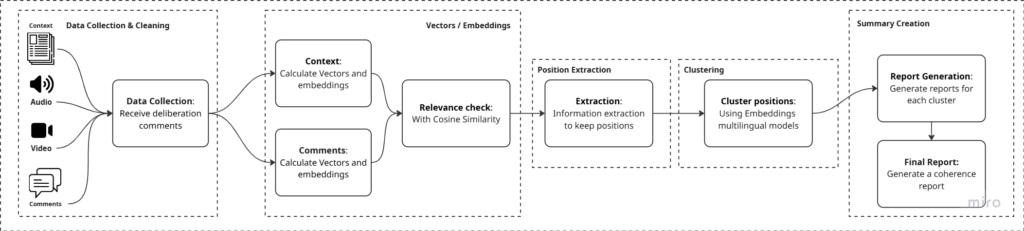
1. The plugin accepts comments in text, audio or video format.
2. All comments are sent together with the main text of the consultation.
3. Numerical representations (embeddings) are created for both the comments and the text of the consultation.
4. Using the cosine similarity index, the relevance of each comment is checked, so that what is not related to the topic is rejected.
5. The main issues and the main positions expressed in the comments are identified.
6. Similar positions are grouped automatically.
7. A short report is created for each comment group.
8. The individual petitions are grouped together in a single summary text presenting the main conclusions of the consultation.
 English